Understanding Iceberg CDC costs on S3: requests, not bytes
When running streaming ingestion into Iceberg, S3 costs are typically more impacted by the number of requests, rather than the amount of data processed. If your S3 bill climbs while your data and queries stay flat, stop counting bytes and start counting requests.
Understanding Iceberg CDC costs on S3: requests, not bytes
When running streaming ingestion into Iceberg, S3 costs are typically more impacted by the number of requests, rather than the amount of data processed. If your S3 bill climbs while your data and queries stay flat, stop counting bytes and start counting requests.
Understanding Iceberg CDC costs on S3: requests, not bytes
When running streaming ingestion into Iceberg, S3 costs are typically more impacted by the number of requests, rather than the amount of data processed. If your S3 bill climbs while your data and queries stay flat, stop counting bytes and start counting requests.
Benedict Chan
Member of Technical Staff
Archie Menzies
Principal Engineer
Iceberg
AWS
Cost Optimization
TL;DR
When running streaming ingestion into Iceberg, S3 costs are typically more impacted by the number of requests, rather than the amount of data processed. If your S3 bill climbs while your data and queries stay flat, stop counting bytes and start counting requests.
Request volumes (and costs) grow with table size and commit frequency, not with the number of rows changed. Fresher data will incur higher costs.
To identify the source of S3 request costs, filter Cost Explorer on the Requests-Tier2 usage type. Then enable S3 server access logging on the bucket (it’s off by default) and group the logged requests by requester to see which process is making them.
It’s normal to think about data costs as proportional to data volumes: more bytes = more compute = higher cloud bills. This assumption holds in some instances; but in streaming ingestion into Iceberg, things get complicated. If there’s one cost-related lesson we learned from running CDC pipelines in production, it’s that your mental model should be requests, not bytes.
Understanding this principle has helped us identify where ingestion costs increase, which opens the door for optimization opportunities. Let’s look at the problem we ran into - which is actually quite common in streaming pipelines - and the cause we identified.
The symptoms
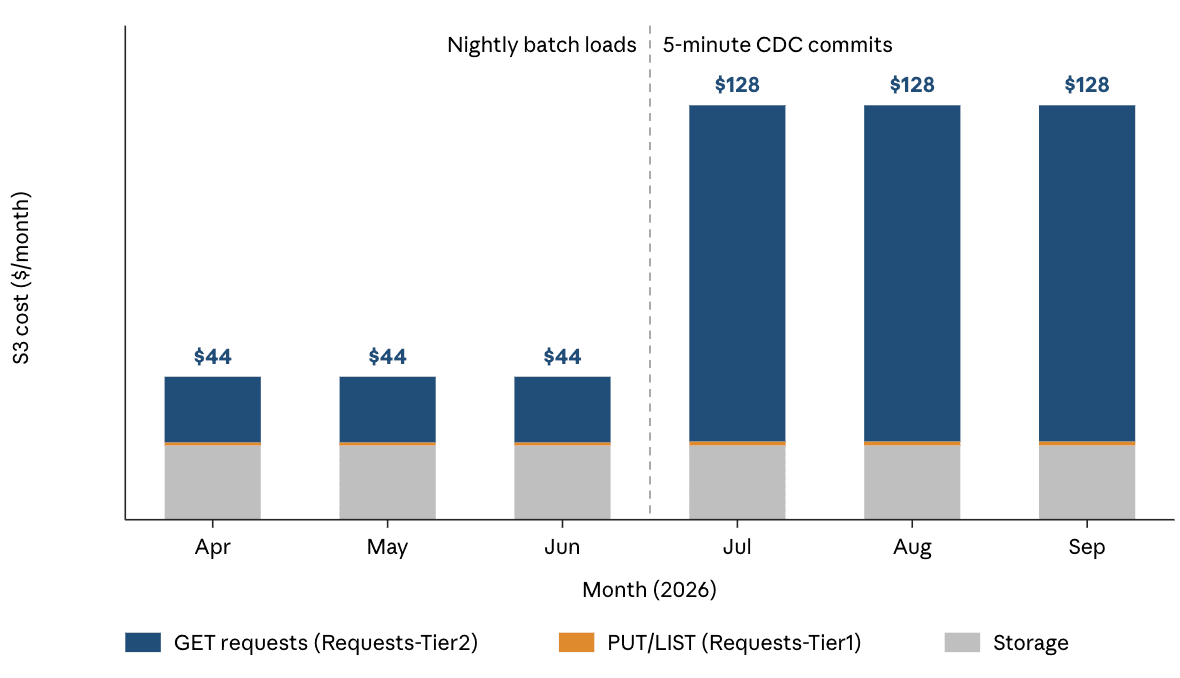
We had recently migrated the ingest pipeline for one of our Iceberg tables from batch workloads to stream processing, using MERGE INTO for updates. In the next few months, our AWS Cost Explorer looked like this:
After moving from batch to 5-minute CDC, we saw a ~2.9x increase in costs. Furthermore:
The increase was driven almost entirely by Requests-Tier2 for GETs in a bucket storing ~8,000 files, feeding into a 1TB Iceberg table.
We did not see a corresponding rise in Requests-Tier1 for PUTs and LISTs.
Nothing else had changed in terms of data or query volumes.
Charges were consistent throughout the day and week, and did not seem impacted by known periods of high query loads.
Since we had about 20 additional tables to migrate - and were aiming for a 30-second interval rather than 5 minutes - we needed to understand what was going on, because we were looking at a major increase in our S3 bill.
What's going on here? Our investigation process
The size of the dataset and the rate of change remained constant, and our cloud bill didn’t indicate an increase in storage or compute costs. We needed to drill down into S3 requests, and what might be causing them to explode.
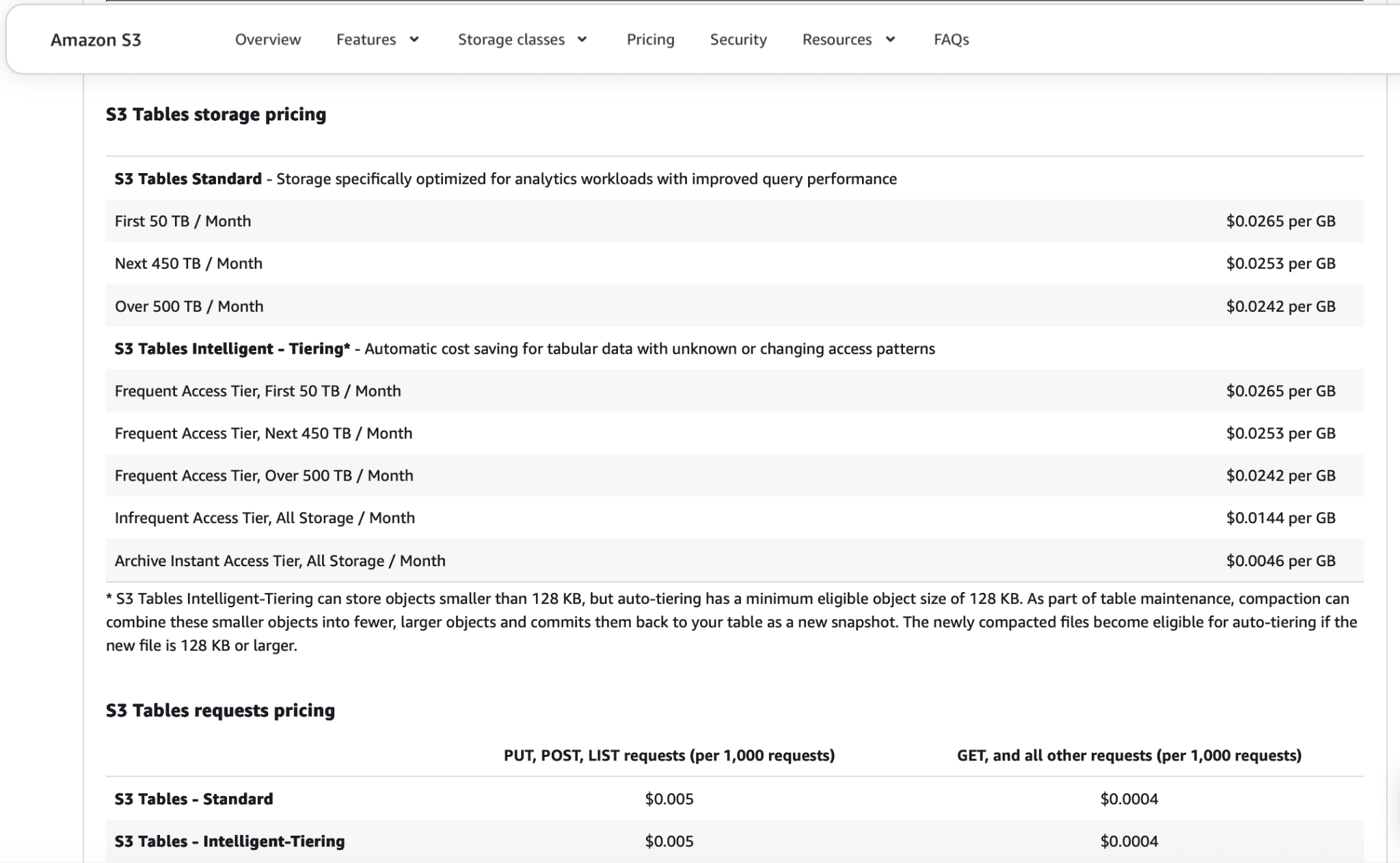
S3 charges for reads per request. In US East (N. Virginia), a GET costs $0.0004 per 1,000 requests ($0.40/million), whether it fetches a byte range of a few kilobytes or a whole 128 MB file. Moving that data to compute in the same region is free. Your S3 bill tracks how many files each operation reads, multiplied by how often operations run.
This is very different from a query service like Athena, which bills based on the amount of data scanned. For the purposes of analytics query optimization, bytes absolutely do matter. But more data is unlikely, on its own, to be the cause of a rapidly-growing S3 requests bill.
Ruling out the usual suspects
Queries (i.e. the traditional ‘small files’ problem): Queries can drive up request costs, especially when every query has to open thousands of small files. This is the ‘small files problem’ that most writing on Iceberg costs talks about (e.g.), and it's typically solved by compaction and partitioning.
→ In our case, the table was continuously well-compacted and kept at optimal sizes, partitioned according to query needs, and queries themselves had not increased. We could rule this direction out.
Compaction jobs: Could compaction itself be our culprit? This would fit the pattern of consistently high costs, especially in a streaming pipeline where the ingestion engine is doing the compacting. The compute used for compaction isn't billed as S3 requests, so we can rule it out (and it should stay roughly constant anyway as the total size of the data set hasn’t changed) - but what about reading the files that need to be compacted?
→ Compaction does make a handful of GETs for each file it rewrites, but it only reads files that require attention - i.e., small files written since the last compaction, and files with many deleted rows. When the frequency of table updates is constant, there is an inverse relationship between how often the table is compacted and the amount of files that need to be read during each compaction. In the very worst case, a compaction job will have to read the entire table - but this is also the case for every MERGE INTO operation. It therefore follows that the GET request cost should only amount to a fraction of the cost of updating the table.
Finding the true culprit
Our investigation so far had pointed us to costs being tied to ingestion, and to ruling out compaction. This left us with updates.
Why Iceberg table updates get expensive in continuous ingestion
As we've covered in our previous article, a MERGE INTO in merge-on-read mode is a common way to apply streaming updates in Iceberg: each changed row becomes a position delete plus an insert. In Iceberg v3, those position deletes are written as deletion vectors (DVs). It's the best of the available options (more on the alternatives below), so that's what we'll assume is being used throughout most of this article.
To write those deletes, every MERGE INTO has to find the file and row position of each changed key by joining the changes against the table. In a streaming pipeline, each batch of changes is applied as one MERGE INTO, and each MERGE INTO ends in one commit - so how often you commit determines how often this lookup runs.
Iceberg has no index that says which file holds a given key, beyond min/max stats stored in a file’s manifest. The engine running your MERGE INTO job (e.g. Spark) can use these stats to “prove” a key won't be in a specific file. But in a CDC pipeline, the distribution of updates over time is often random, so each file's key range will tend towards the full key space which prevents efficient pruning.
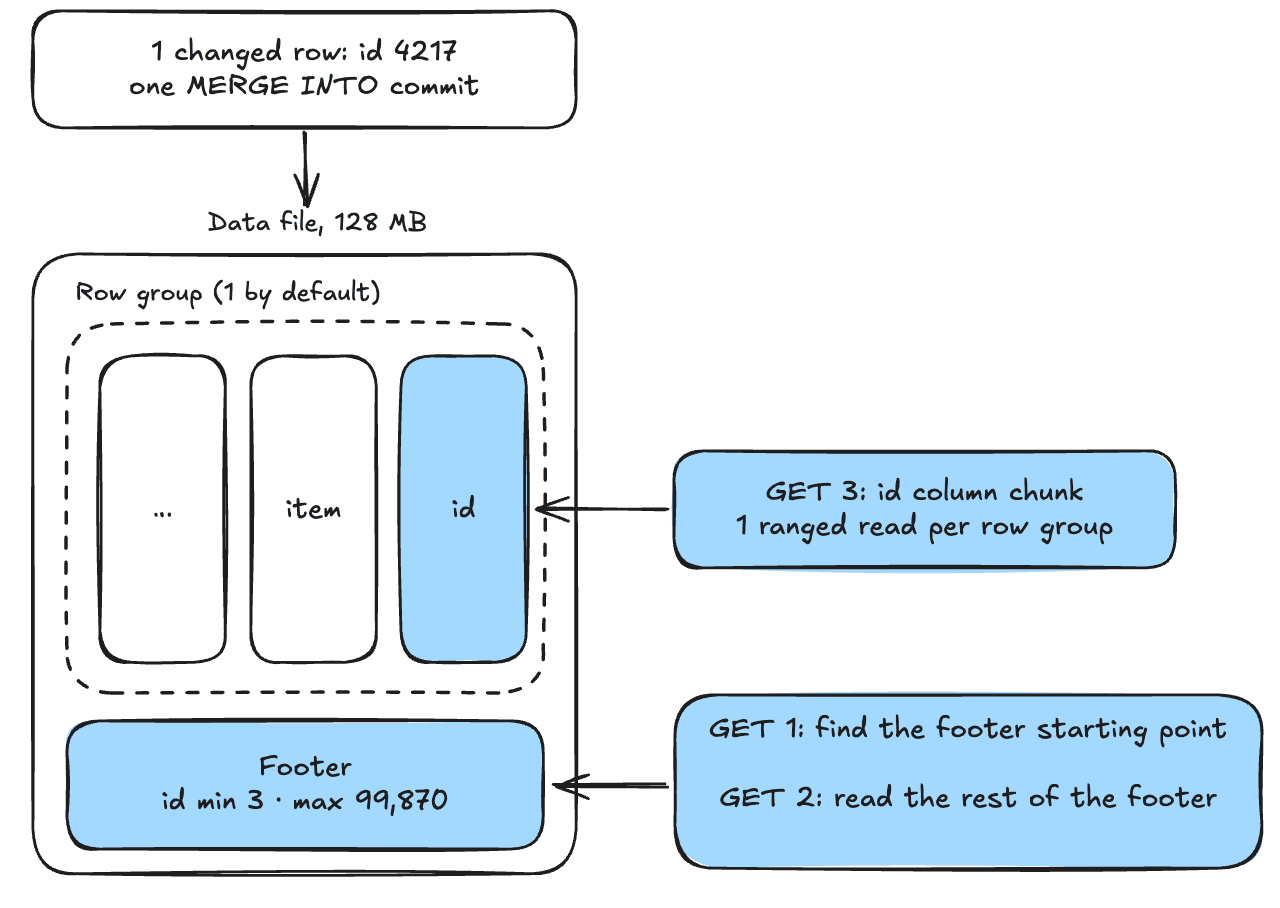
Since files can’t be pruned, virtually every file in the table needs to be read. The engine needs to run 2 GETs for each file footer, and 1 GET for each row group across all of the files. With spark defaults, you can expect 4 row groups per file, and due to how the Iceberg libraries distribute work, the cost would tend towards 3 GETs per row group on average. To keep things simple, we are assuming files compacted to 128MB, enough for one row group, so each file costs 3 GETs.
Each of these is a ranged GET, where the engine reads only the footer and the key column, i.e. a small slice of the file. That keeps the bytes down - but as we saw, S3 charges a ranged GET the same as a full one.
The result is that the number of GET requests, and associated costs, are mostly determined by:
The number of files in the table, and
the frequency of commits.
The number of rows updated mostly doesn't matter. At 8,000 files you'd have ~24,000 GETs per commit, plus a handful of PUTs for the new files and metadata - and this is the case whether 10,000 rows have changed or 10 million. Because each file’s key range spans nearly the whole keyspace, the min/max stats can’t rule any file out, so you will need to read virtually every file either way. In addition, you will need to read the existing deletion vectors for the files you're deleting from, which are stored in Puffin files on S3.
The commit interval matters… a lot. More commits mean fresher data, but each commit multiplies your costs. Compaction only reads the files that changed since its last run, so over time it reads a fraction of what the merge does: the merge reads nearly every file on every commit. Let’s look at an example:
How S3 request costs scale with commits - in numbers
At 3 GETs per file, $0.40/million GETs and $5/million PUTs, the main determinant of our requests charge is how frequently we commit to our Iceberg table. Our 1TB table consists of 8,000 files, each 128MB and containing a single row group. For simplicity we are also assuming that all DVs are located in a single puffin file that only needs to be fetched once. 5-minute commit intervals in a 730-hour month, we get:
The worst-cost scenario for compactions is to run them as frequently as possible, after every ingestion commit. Assuming the table is well-compacted, each compaction will only read the new files written by ingestion (this discounts the rewrites of existing files with a high proportion of deletes: we can expect that some compactions will need read more files to do this, but the cost will be amortized by the infrequency at which it happens):
If we shorten the commit interval, we increase the number of commits, and the total costs:
Commit interval
Ingestion
Compaction
50 min
$8.44
< $0.01
5 min
$84.36
$0.01
30 s
$843.62
$0.14
For a table that reaches multiple terabytes, these costs could climb to thousands of dollars per month. And they would only stay proportional to table size if we're assuming the table is well-compacted - remember, what matters is the number of files, not the number of bytes read or the amount of rows updated. Compaction compute is not impacted by the number of commits. For reference, S3 Tables charges about $5 per TB processed for its managed compaction, plus a per-object fee, per AWS documentation.
The alternatives are worse!
There are other ways of updating Iceberg tables - but neither of them solves the cost issue, and both come with other problems:
In copy-on-write, we still need to do the same costly lookup to find the changed rows, and then rewrite every matched file in full. With changed keys randomly distributed across the table, that means rewriting most of the table on every commit: the same lookup GETs, plus whole-file reads, many more PUTs and far more bytes written.
Equality deletes are executed on read; at that time, the query engine needs to do a similar lookup - often at much greater scale. Assuming random key distribution in the table, each equality delete could potentially affect every file in the table, resulting in a massive read amplification, compared to 2000 file reads using DVs, which have a strict 1:1 relationship with data files. Snowflake and Databricks do not support equality deletes, largely because of the read-time performance cost (also covered in our deletes article).
Wait, what about S3 Tables? Don't they fix this?
The short answer is no.
Amazon S3 Tables are the AWS version of managed Iceberg, with various built-in optimizations such as automated compaction. However, using S3 Tables does not impact pricing for GET and PUT requests, which stay $0.4 and $5 per 1,000,000 requests, respectively. Since S3 Tables don’t add an index from key to file, a MERGE INTO will still need to read nearly every file, and make the same amount of requests.
In fact, your storage costs might increase - for frequently-accessed files, you will be paying $0.0265 per GB, compared to $0.023/GB in "vanilla" S3 (US East prices).
Where you could see some benefit: When you use S3 Tables, AWS will automatically compact your tables, which keeps file counts lower. However, our examples have so far assumed perfect compaction - and as we've shown, this is not enough to control costs.
How to think about controlling and predicting ingestion costs
Hopefully, this article has given you a pretty good idea of how requests impact the costs of streaming ingestion, and what causes requests to increase. We’ll leave you with three takeaways:
1. Diagnosing cost issues
Your main takeaway should be that queries and compaction both generate S3 requests – but in high-frequency streaming, MERGE INTO is often going to be the main culprit when your S3 bill spikes.
To determine whether this is the case, filter Cost Explorer on Requests-Tier2, enable server access logging on the bucket to see which process is making the GETs. If your table is well-compacted and queries have not increased, you can rule out other explanations.
2. The impact of data freshness
In a busy CDC table, nearly every commit has to read nearly every file. Your monthly GET count comes out at roughly:
files in the table × GETs per file × commits per month
Zooming out for a moment, we can say that there are really two factors at play here:
Randomly distributed keys and frequently changing data. These are factors outside of your control. In high-volume CDC, changes tend to be very frequent, e.g., every pageview might update the "last page seen" field for a different user each time, anywhere in the table.
The latency of your Iceberg tables. Higher latency will reduce the number of commits and can reduce your costs. Of course, if you're doing streaming, it's unlikely you're willing to accept 50 minute latency; but this relationship between data freshness and ingestion costs is worth keeping in mind. If a specific table doesn’t require very fresh data, you can consider setting a higher interval.
3. A free tool to help forecast your Iceberg costs
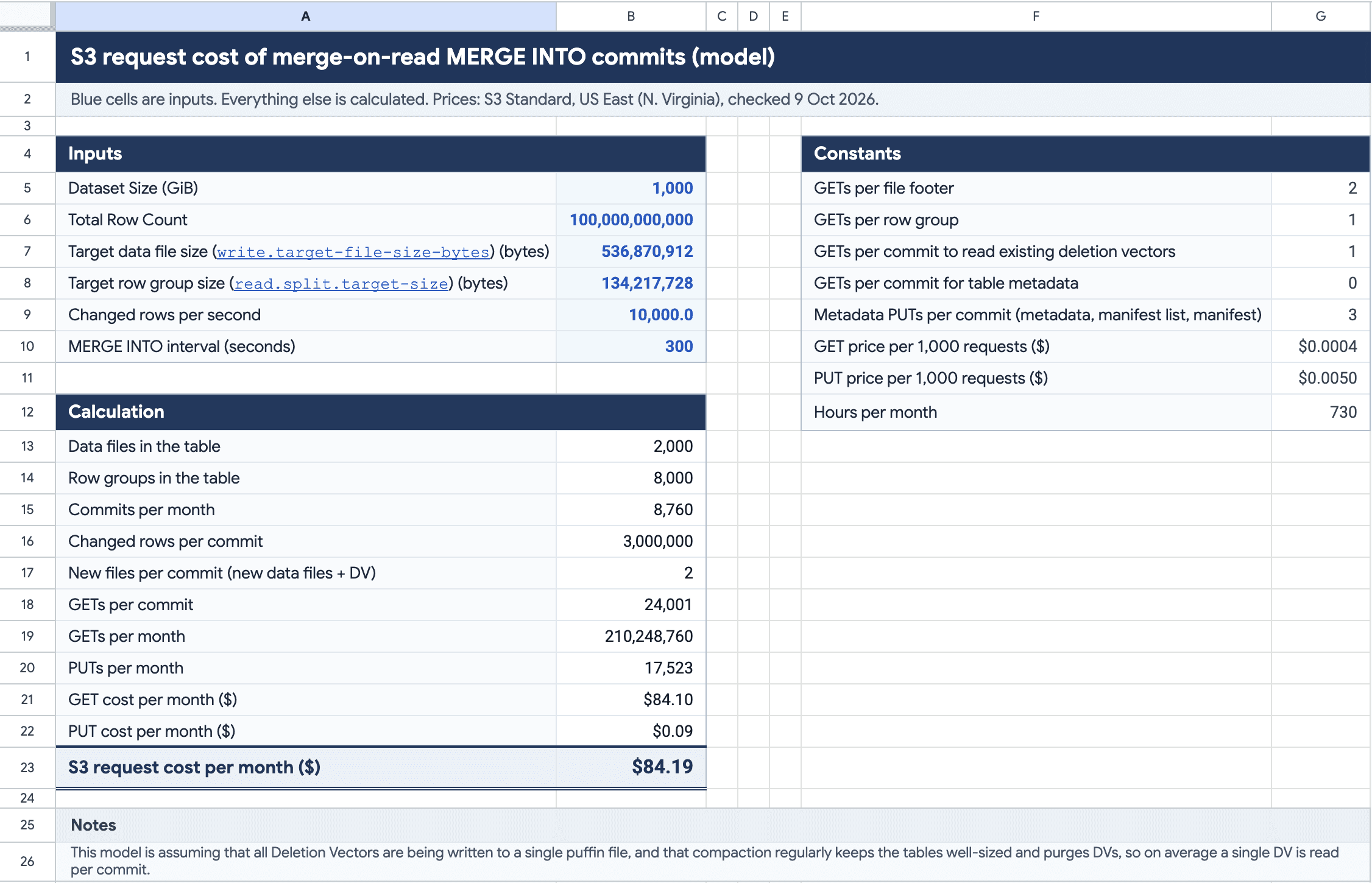
To make this easier to reason about for your own tables, we've put together a simple cost model in Google Sheets. You can make a copy here:
Input the size of your data set, the table properties of your Iceberg table, how many rows change per second and how often you run MERGE INTO, and get an estimate of the monthly cost of ingesting to that table. Note that in practice there will be many other factors at play - from your AWS region to the efficiency of your compaction - so use this just to get the order of magnitude, which you then check against your actual bill.
And if you want a 4-word rule of thumb: count requests, not bytes.
Want more in-depth analysis like this directly in your inbox? Consider subscribing:
Stay current on data pipelines
Technical deep dives, customer stories and product news from the Etleap team.
By subscribing, you agree to receive blog emails from Etleap. Unsubscribe anytime. Privacy Policy
Stay current on data pipelines
Technical deep dives, customer stories and product news from the Etleap team.
By subscribing, you agree to receive blog emails from Etleap. Unsubscribe anytime. Privacy Policy
Stay current on data pipelines
Technical deep dives, customer stories and product news from the Etleap team.
By subscribing, you agree to receive blog emails from Etleap. Unsubscribe anytime. Privacy Policy
Stay current on data pipelines
Technical deep dives, customer stories and product news from the Etleap team.
By subscribing, you agree to receive blog emails from Etleap. Unsubscribe anytime. Privacy Policy